Function
Wedding Band Eight Piece Stage Plot Template for Gigs
An eight piece wedding band stage plot template with drums, rhythm section, horns and vocals mapped out, so you can advance any ballroom or tent gig fast.
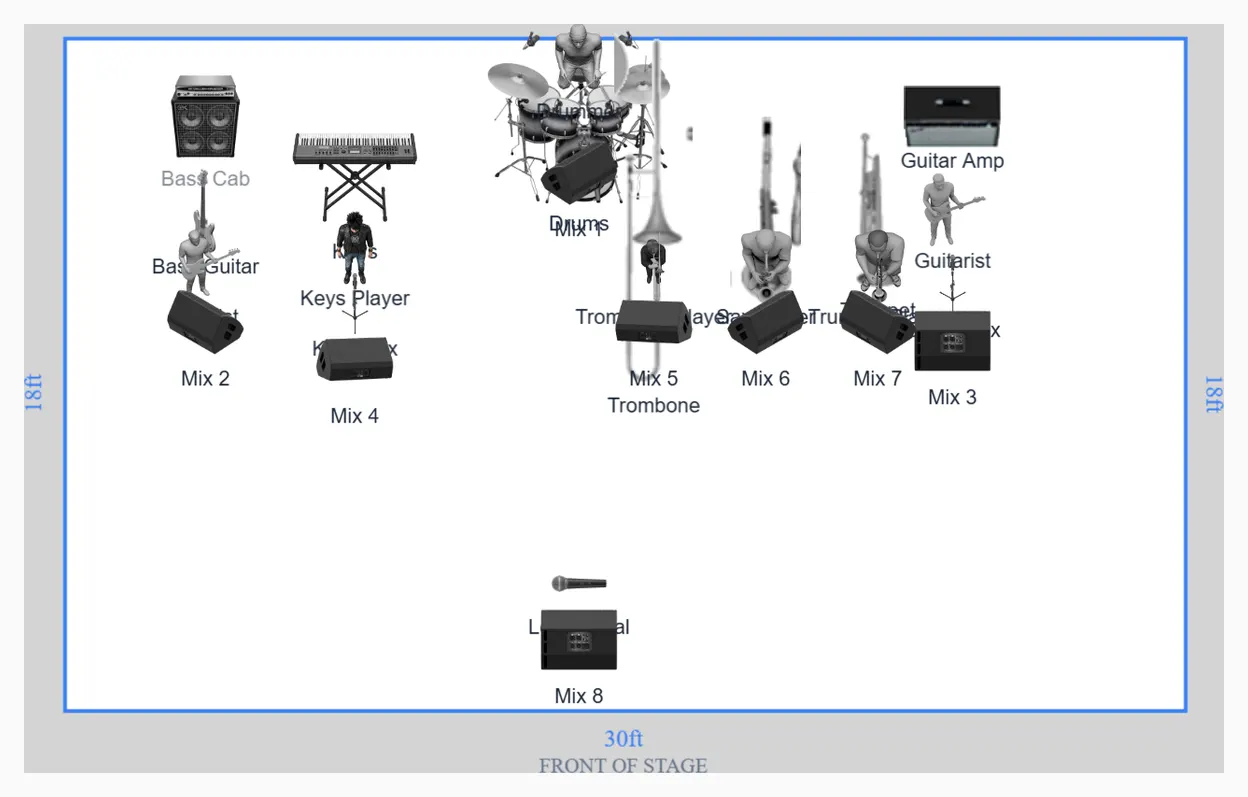
Eight monitor mixes on a stage only 30 feet wide
The hard part of this plot is not the channel count. It is that eight players each want their own wedge on a stage 30 feet wide and 18 feet deep, and the console waiting for you in most hotel ballrooms has fewer spare mixes than that once the house has taken its cut.
Count it on the desk you are most likely to meet. An X32 or M32 gives you 16 mix buses. Four usually go to effects returns and two to front fills, which leaves ten. An Allen and Heath SQ5 gives you 12 mixes in total. Eight wedge sends survives on either, but only if nobody has also asked for a spare vocal mix, a feed for video, and a wedge for the emcee. Put the number in the advance email so the engineer patches for it rather than discovering it at four in the afternoon.
Where the compromise goes when the sends run out
The three horn players stand between the 17 and 23 foot marks, inside six feet of each other and all facing the same way. That row is the first thing to collapse. One shared wedge covering trombone, sax and trumpet takes you from eight sends down to six and costs the section almost nothing, because horn players standing in a line already hear each other acoustically. What they want in the box is rhythm section and lead vocal, not more of themselves.
Do not collapse drums and bass into one send to save another. The kit sits dead centre upstage and the bass rig is ten feet away at the stage left edge, which is far enough that the bassist cannot reliably hear the kick unaided on a carpeted ballroom floor with a full room in front of it.
Nineteen channels, and the two that always get argued about
- Drums. Eight or nine from the miked five piece kit, depending on whether the toms get individual mics or share overheads.
- Bass. One DI. The 4x10 cab is backline on this plot, not a second channel, so nobody patches it twice.
- Guitar. One mic on the combo at stage right.
- Keys. A single rig and one stereo pair, so two channels.
- Horns. Three, one per player, on stand mics rather than clip ons.
- Vocals. Three. Lead on a wireless handheld at centre three feet off the front edge, guitar and keys on boom stands at their own stations.
The two arguments never change. Horn mics: condensers need phantom and hear the whole stage, dynamics do not and sound smaller in the house. Keys: mono saves a channel and almost nobody in a ballroom will hear the difference once the floor is full.
Dance floor volume is a room problem before it is a stage problem
A wedding dance set runs 95 to 100 dBA at the mix position, and a growing number of hotels now write a 95 dBA cap into the contract with a meter to enforce it. Eight wedges at gig level put real unmixed energy on stage before the PA contributes anything. When the room is capped, the wedges are what has to come down, and the fastest headroom comes from pulling the horn and guitar wedges rather than the vocal. The reasoning behind that order is in the monitor mix guide.
What the advance has to nail down
Ballroom stages are rarely the size the sales sheet claims. Ask for usable depth behind the pipe and drape, not the deck dimension, and ask whether the dance floor cuts into the downstage edge. Thirty by eighteen works. Thirty by twelve is a different plot, and you want to know that a week out rather than on the day. The stage dimensions guide covers exactly what to ask for.
Three more lines belong in every wedding advance:
- Changeover. Dinner service to downbeat is usually 45 minutes with guests already in the room. That is a setup window, not a soundcheck.
- Power. Two 15 amp circuits on the deck, one for backline and one for everything else, and not shared with the lighting vendor.
- Wireless. One handheld here, plus whatever the venue runs for speeches and whatever the DJ brings. Trade frequencies in writing beforehand.
Open the template, share the horn wedge if your section will accept it, rename the three vocal channels to real names, and export the PDF.