Stageplot Pro /
School Musical Stage Plot: Wireless Mic Handoffs Made Easy
Build a school musical stage plot that handles wireless mic handoffs between rotating cast members and a small pit band sharing a cramped multipurpose room.
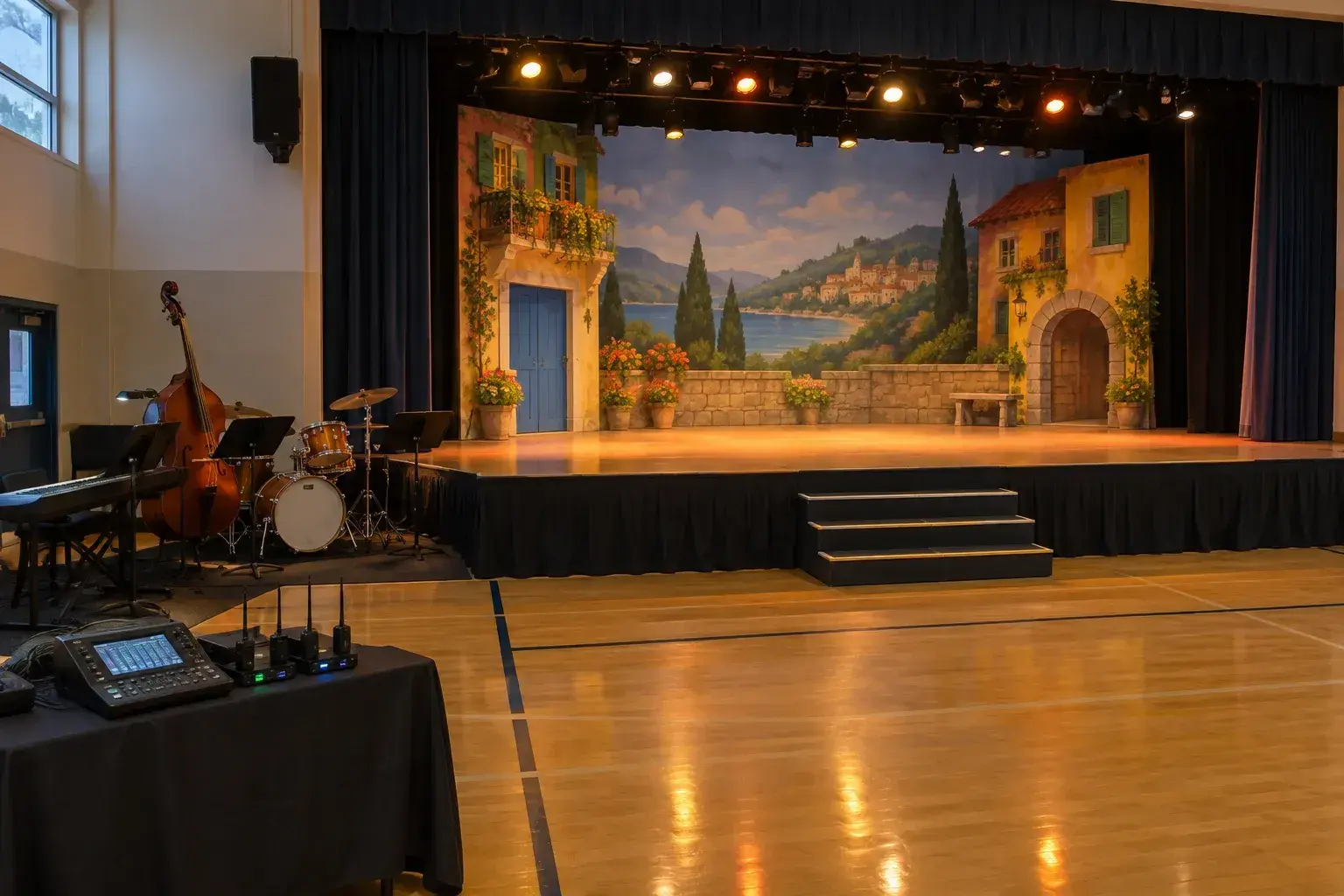
A school musical is the hardest sound job most volunteers will ever meet. Twenty-odd students share a handful of wireless microphones, a pit band of six or seven players sits a few feet from the front row, and the whole thing happens on a cafeteria stage with a ceiling that bounces every sound back at you. Add a parent volunteer who has never touched a mixing console, and a clear drawing becomes the most useful tool in the building.
This guide walks through a school musical stage plot built around the two problems that cause the most pain: passing wireless mics between performers, and fitting a pit band into a room that was never designed for one. If you have never drawn a plot before, start with how to make a stage plot and come back here for the musical-specific parts.
What belongs on a school musical stage plot?
A school musical plot shows four things: where the pit band sits, where the wireless mic receivers and the sound desk live, which stage areas the cast uses, and where every monitor and cable run goes. Draw it for the volunteer, not for a touring engineer, so every box carries a plain name.
Start with the room itself. Measure the stage depth and the width between the wings, then note any steps, curtains, and the position of the nearest wall outlets. A multipurpose room often has one power circuit shared with the kitchen or the gym lights, so mark which outlet feeds the mixer and which feeds the pit. A lights-on, popcorn-machine-on trial run has saved more than one opening night from a tripped breaker.
Next, place the pit. In a room without a real pit, the band usually sits on the floor in front of the stage, stage left or right of center, or on a riser at the side. Draw each player's chair, stand, and amp as a labeled box. Label them by instrument and by the student's name or section, such as Piano, Bass, Reeds, Percussion. Parent volunteers read names faster than they read icon shapes.
Finally, add a short legend. Keep it to one line per item, in plain language: where the mixer sits, who watches the mics backstage, and where the director conducts from. The stage plot checklist is a good way to confirm nothing is missing before you print.
How many wireless mics does a school musical really need?
Most school productions get by with eight to twelve wireless microphones for a cast of twenty to thirty. You rarely need one per student. You need one per simultaneous speaker, plus a spare, and a plan for which character wears which pack in each scene.
Count the maximum number of speaking and singing leads on stage in any single scene. That number sets your minimum. In a typical show, the busiest scene is the opening number or the finale, where six to eight principals sing at once while the ensemble sings into a few choir mics or hangs mics over the stage front.
Here is a workable setup for a mid-sized cast:
- Eight handheld or body-pack wireless mics for principal roles, with headset or lavalier capsules for anyone who dances
- Two or three hanging choir condensers or boundary mics at the stage lip for the ensemble
- One spare wireless pack, charged, with fresh batteries, kept at the backstage handoff table
- One wired handheld on a cable for the director's announcements and emergencies
Every wireless system in the room must sit on its own frequency. Cheap systems in the 500 to 600 MHz range collide with local television and with each other. Run an automatic scan on each receiver, then lock the frequencies and write them on tape beside the receiver. A systems list taped to the rack beats trying to remember which pack is on channel five.
How do you hand off wireless mics between cast members?
Use a single handoff table in the wings, staffed by one named volunteer, with each body pack labeled by character role and mic channel. The performer leaving the stage drops the pack, the next performer picks it up and gets help clipping it on, and the mixer unmutes only after a hand signal.
Three habits make this work in real rehearsals:
- Label by channel, not by student. Students change, but channel six is always the Narrator's lav. Colored gaffer tape on the pack and a matching strip on the input list removes any doubt.
- Mute at the pack, then at the desk. The backstage volunteer flips the pack's mute switch before removing it, so no thump or rustle reaches the speakers. The mixer also mutes that channel until the next performer is clipped on and has said a test word in the wings.
- Place the mic in the same spot every time. Mark a spot on the forehead or cheek for a headset, and a collar point for a lavalier. A mic that moves three inches changes the tone and the feedback margin.
Expect the first few rehearsals to feel messy. Quick changes of fifteen seconds or less mean that a pack swap will occasionally fail. Decide beforehand which scenes tolerate an unmiked line and which absolutely do not. For those critical scenes, keep the mic on the same actor throughout and swap costumes around the mic instead of the other way around.
Batteries deserve their own ritual. Use fresh alkaline cells every show, not partly used ones, and write the install time on a piece of tape on the pack. A dead mic on the lead during the second act is the most avoidable failure in school theater.
Where does a small pit band fit in a cramped multipurpose room?
Place the pit band to the side of the stage rather than directly in front of it, keep drums and amps low and angled away from the cast, and give the director a clear sight line to both the band and the stage. Use risers or the floor depending on ceiling height.
A small pit might be a keyboard, a bass, a drummer, a guitar, and three or four winds. Each of them wants to hear the others and the cast, yet none of them wants to drown the singers. A few specifics help:
- Put the drummer against a side wall, with a plexiglass shield or a heavy curtain if the kit is loud, and ask for brushes or hot rods on quiet numbers.
- Keep amps off the floor on a chair or stand and tilt them toward the player's ears, not the audience.
- Run the keyboard and bass direct, using a passive DI box, so you can mute the amp entirely and take the sound from the house speakers.
- Place the conductor between the pit and the stage with a small music stand light, and mark the position with tape on the floor.
If players need to hear the cast, a single monitor wedge angled at the pit often beats headphones, which isolate players from the director. One wedge with only vocals in it keeps the mix simple. Drawing the wedge on the plot, with an arrow showing its direction, gives the volunteer a clear target at setup.
Watch the sound relationship carefully. A loud pit forces the cast to push, and pushed teenage voices fatigue fast across a three-night run. The goal is a band that supports the singers, with the house system doing the work of lifting the voices above it.
How can a parent volunteer run the console on opening night?
Give the volunteer a one-page cheat sheet: a labeled input list, a pencil-marked fader position for each lead, and three rules. Raise a fader only when someone is speaking, mute channels when actors exit, and never touch the gain knobs once rehearsal ends.
Most school sound desks are small digital mixers or an analog desk with eight to sixteen channels. A first-timer does not need to learn compression or equalization. They need to learn faders, mute buttons, and the master. Tape a strip of paper above each fader with the character name and the actor's current mic.
A simple workflow for the show looks like this:
- Before doors open, power up the desk first, then the amplifiers or powered speakers last, to avoid pops.
- Set all faders to the marked starting spots and un-mute only the channels for the first scene.
- During the show, follow the script. Keep a marked copy beside the desk showing which mics are open in each scene.
- At each scene change, mute outgoing channels before opening new ones.
- After the show, mute everything, power down the speakers first, then the desk.
If your mixer supports scene recall, a teacher or a technically inclined student can save a snapshot for each act. Recalling a scene is one button press and removes the most error-prone part of a live mix. If it lacks scenes, a laminated card with fader positions does almost the same thing.
A second volunteer on a headset between the desk and the backstage handoff table is worth more than any piece of gear. A quick call of mic six is going on, or hold the Narrator, keeps the two ends of the signal path in sync.
What should the input list look like for a musical?
Write the input list in the order the signals appear on the desk: pit instruments first, then principal wireless mics, then ensemble and spares. Each row names the source, the mic or DI type, and any note about who wears it. A clean list keeps channels stable across the entire run.
Here is a sample list for a cast of twenty-five with a seven-piece pit:
- Channels 1 to 2: keyboard, stereo DI
- Channel 3: bass, DI
- Channels 4 to 6: drum kit, kick, snare, and one overhead
- Channel 7: guitar, DI or small amp mic
- Channels 8 to 9: reeds, clip-on mics
- Channels 10 to 17: principal wireless mics, labeled by character
- Channels 18 to 19: ensemble choir condensers
- Channel 20: spare wireless
- Channel 21: director's wired handheld
Keep the numbering the same from the first rehearsal to closing night. If a student leaves the show or a role is recast, change the name on the label, not the channel. This also helps if a different volunteer steps in for the Saturday matinee, because the paper list matches what is on the desk. You can build and share this list from your plot so the printed sheet and the drawing never disagree.
How do you rehearse the handoffs before opening night?
Run a dedicated tech rehearsal with no singing, where the cast walks through every mic exchange at full speed while the volunteers practice mutes, pack swaps, and cues. Add a full dress rehearsal with the pit afterward, and treat it as the only true test of the system.
A useful sequence for the tech day:
- Walk the quick changes in order, timing each one with a phone stopwatch.
- Mark the scenes where a handoff fails the time test, and fix them by moving a mic to a different actor or rescheduling a costume change.
- Run the loudest number twice, once with the pit and once without, to see how much feedback margin the room allows.
- Walk the stage with a mic open and the speakers up, marking any spot that rings, and ask directors to avoid blocking a lead there.
Record the dress rehearsal on a phone or small recorder placed at the back of the room. Listening afterward reveals missing words, late fader moves, and spots where the band covers the singers, all things nobody notices from behind the desk.
One last tip: keep a small kit of gaffer tape, spare batteries, a flashlight, and a roll of paper towels at the desk. Most opening-night emergencies are solved by one of those four items.
What mistakes should school sound teams avoid?
The common failures are underplanned power, unlabeled mic packs, a pit that is too loud, and a volunteer who learns the desk for the first time during dress rehearsal. Each of these is preventable with a clear drawing and one practice session.
Watch for these in particular:
- Plugging the mixer and lights into the same circuit, then losing everything when the lights come up
- Letting students share a pack without cleaning the headset or lavalier between uses
- Leaving the stage monitors up too high, which causes the first feedback squeal of the night
- Skipping a written scene list, so the volunteer must guess who sings next
Treat the drawing as a living document. Update it after every rehearsal, date it, and print it. A stage plot that matches the room on opening night turns a room full of nervous students and volunteers into a crew that knows exactly where everything lives.
Frequently asked questions
- How many wireless microphones do we need for a school musical?
- Count the most speaking or singing leads on stage at the same moment, then add one spare. Most casts of twenty to thirty work well with eight to twelve wireless mics, plus two or three hanging choir mics for the ensemble. Share packs between actors by assigning each pack to a character, not a student.
- Can a parent who has never used a mixer run sound for the show?
- Yes, with preparation. Give them a labeled input list, marked fader positions, a script showing which mics are open in each scene, and a short practice session before dress rehearsal. They only need to move faders, press mute, and leave the gain settings alone once the rehearsal is done.
- How do we keep the pit band from overpowering the singers?
- Seat the band to the side of the stage, angle amps toward the players, shield or soften the drums, and take keyboards and bass direct through DI boxes so their amps can stay quiet. Then let the house speakers carry the vocals above the band. Ask the conductor to cue softer dynamics under dialogue.
- What do we do if a wireless mic fails during a performance?
- Keep one charged spare pack and one wired handheld at the backstage table. Have the backstage volunteer swap the pack at the next exit and tell the mixer by headset. Fresh batteries before every show prevent most failures, and you should decide in advance which scenes can survive a missing mic.