Stageplot Pro /
Open Mic Host Stage Plot: One Setup for Every Performer
An open mic host stage plot built for fifteen-minute turnarounds: fixed inputs, a labeled channel strip, and a layout any solo or duo can use untouched.
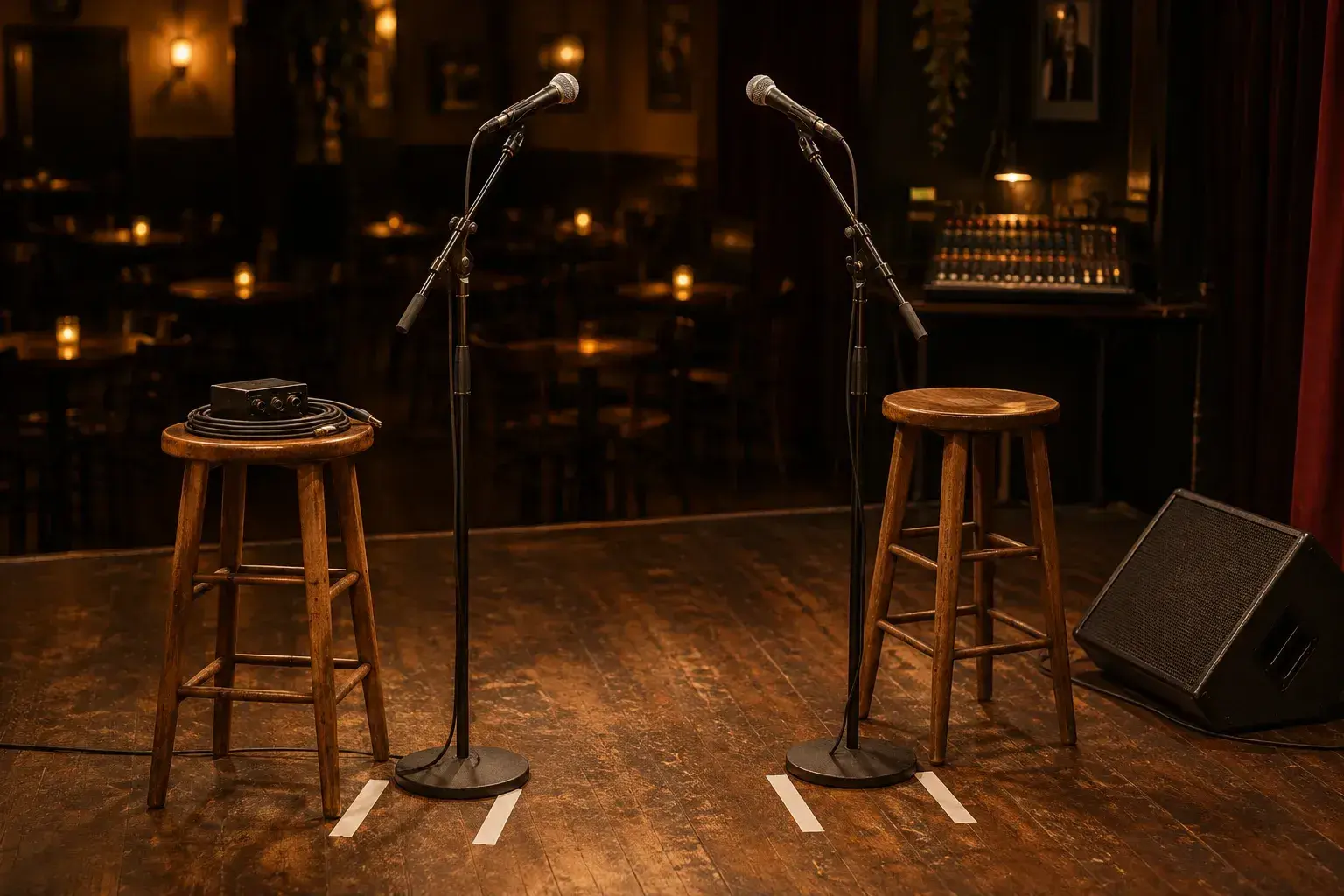
A weekly open mic is a strange production problem. Your stage never gets a soundcheck for the act that is actually about to play, the performer list changes every week, and the person running the console is often also the host, the sign-up sheet keeper, and the one who tells the next singer to please tune off the mic. The answer is not a better memory. It is a single, boring, well-documented stage plot that every act can fit into without anyone touching a fader.
This guide walks through how to build that plot, what to leave permanently patched, and how to keep the changeover under two minutes.
What should an open mic host stage plot actually show?
It should show the fixed house rig exactly as it sits every week: where the vocal mic, the acoustic DI, the amp, and the monitor wedge live, plus the channel each one is patched to. The plot is a map of a stage that never changes, not a portrait of any one act.
That is the key mental shift. A touring band draws its own gear. An open mic host draws the room. Think of the plot as a permanent installation drawing with four or five labeled positions, and every performer who steps up simply plugs into one of them.
A useful house plot usually contains:
- A center vocal mic on a boom stand, patched to channel 1, with a dynamic capsule such as a Shure SM58 or Sennheiser e835 that tolerates the mix of beginners and loud belters.
- A second vocal mic stage left or right for duos, patched to channel 2, identical to the first so the engineer never has to remember which one is the "good" one.
- A direct box for acoustic guitars, patched to channel 3, with a short instrument cable already plugged in and coiled on the stool.
- A second DI for a keyboard or a second guitarist, patched to channel 4.
- A small guitar combo amp, optional, with a microphone already placed on the grille and patched to channel 5.
- One floor wedge, aimed at the center position, on aux 1.
If you build this in the Stageplot Pro editor style, keep the icons to exactly those items and nothing speculative. Resist the urge to draw a drum kit that only appears twice a year.
How do you handle a different performer every fifteen minutes?
Treat the console like a vending machine: every input is already live, already gain-staged, and already routed, so a performer picks the channel that matches their instrument and the engineer only adjusts one fader. Nothing gets reset between acts, only unmuted or muted.
In practice, this means doing the hard work once, before doors. Set gain on each input using a representative signal: a host speaking at singing volume for the vocal mics, and someone strumming an acoustic hard for the DI channels. Mark the gain knob positions with a strip of white tape on the console or write them on a laminated card taped above the channel strip. Digital consoles such as a Behringer X32, Midas M32, or Allen and Heath SQ make this easy by saving a scene, but even an analog Mackie works if you note the knob positions.
Then build a performance routine around the fact that you cannot soundcheck in the usual way:
- The act waiting next stands at the side of the stage while the current act finishes the last song.
- As soon as applause starts, the host mutes the outgoing channels and the on-deck performer moves to the positions already marked on the floor with gaffer tape.
- The new performer plugs in and plays one chord or sings one line while the engineer raises that channel until it sits right.
- The host announces the act by name, using the time to cover any remaining adjustment.
The announcement is doing real work here. It is a thirty-second buffer for the engineer to fine-tune while the audience pays attention to the host instead of watching a stranger fiddle with a cable.
Which inputs belong on a permanent open mic input list?
Keep the permanent list short: two vocal mics, two instrument DIs, one optional amp mic, and one playback or phone input for backing tracks. Anything beyond that invites mistakes, because every extra open channel is another source of feedback and hum.
A workable channel layout looks like this:
- Channel 1: Vocal A, center, SM58 or equivalent
- Channel 2: Vocal B, duo partner, same model
- Channel 3: Acoustic DI A, active direct box
- Channel 4: Acoustic DI B or keyboard, active direct box
- Channel 5: Amp mic, optional, only if a combo is on stage
- Channel 6: Aux input for a phone or tablet playing a backing track, through a stereo DI summed to mono
Label every channel with a physical strip of console tape and also on the wall of the sound area, since the person covering for you on vacation night will not have your memory. For a deeper explanation of why this ordering helps a stranger take over the desk, the guide to making a stage plot covers how labeling and sequence reduce errors on any show.
A note on phantom power: do not leave +48V on for every channel by default. Only the condenser microphones or active DI boxes that require it should receive it, and a performer plugging a vintage ribbon mic or a cheap passive pickup into an unprepared line is exactly how a bad pop happens. Enable phantom only on the channels that need it and leave the rest off.
How do you set up the stage so duos and solos both fit?
Place the vocal mics side by side about four feet apart at center, give each position a stool, and put the wedge slightly angled toward the middle. That one geometry works for a lone singer-songwriter, a duo sharing a stage, or a guitarist with a harmony partner.
The layout matters because open mic acts rarely follow a template. One person might sit with an acoustic. The next might stand with a loop pedal. A duo may want both performers close enough to share a monologue between songs. By setting the two vocal positions as equal equals, you avoid asking anyone to move.
Practical placement details:
- Mark the floor with two small gaffer tape crosses where the stool feet should sit, so the stool never wanders toward the front of the stage.
- Run the XLR cables from a stage-left floor pocket or short snake to the mic stands and tape them down in a single line along the back of the performer zone, never across the walking path.
- Keep the wedge off to the front-center, a few degrees off axis to the mic, which reduces the chance of feedback when someone sings at full volume.
- Put a small side table or a drink rail at the edge of the stage for water, a capo, and phones, so performers do not set things on the DI box.
For reference, the solo acoustic guitarist stage plot template is a good starting point for the single-performer side of the room, and you can duplicate it for the duo position.
What is the quickest way to prevent feedback from rotating acts?
Ring out the wedge and the main speakers once, before doors, and cut the offending frequencies on a graphic or parametric EQ. Then keep the monitor level moderate for the whole night, since changing it between acts is the fastest route to a howl.
Feedback at an open mic almost always comes from three sources: a wedge too loud, a vocal mic pointed at the wedge, or an acoustic guitar with an open soundhole near a monitor. You can solve the first two with a one-time ring-out. Put a vocal mic in position, raise the monitor aux until the system just begins to ring, notch that frequency with a narrow cut of a few decibels, and repeat for the next two or three rings. Stop there. Over-notching drains the sound and makes everyone sound thin.
For the third source, teach the host a standard line: acoustic players put a soundhole cover in or angle the guitar slightly away from the wedge. Keep a couple of cheap rubber soundhole plugs in a drawer at the console and hand one over without discussion.
How do you keep the changeover short without rushing performers?
Give the next performer a ready position, a clear cue, and nothing to set up except their own instrument. A good target is ninety seconds from the last note of one act to the first note of the next, with the host talking in between.
The ingredients are simple. Ask performers to sign up on a clipboard that lists their instrument, so you know in advance whether the next person needs a DI, a second mic, or the amp. Keep a bag of common spare items near the stage: a few instrument cables, a tuner, extra batteries for any active pickups, a capo, a ten-foot XLR, and a phone-to-3.5mm adapter. Most delays are not technical. They are somebody hunting for a cable.
Also consider a short written card that the host reads aloud at the start of the night:
- Plug into the DI on the stool, not the amp.
- Sing into the mic as it is placed, because we will not move it between acts.
- Tell the host if you need the backing track input.
- Tune before you step up, not on the mic.
Performers appreciate clear rules. Most of them are nervous, and structure makes them less so.
How do you document the plot so a substitute can run the night?
Print the plot and the channel list on one page, laminate it, and tape it to the console. Include a photo of the floor markings, the saved gain notes, and the order in which to power the system on and off.
The page should answer a stranger's questions in under a minute. Where is each microphone patched, and which channels need phantom power? Which fader group is the main mix, and what are the safe starting levels? How do you power on the mixer before the amplifiers, and in what order do you turn things off at the end of the night? Write each answer plainly.
If you move the venue, change the weekly night, or upgrade equipment, update the plot and reprint it. A stale document is worse than none, because people trust it. Revise on the same day you change the rig, and date the sheet in a corner so it is obvious which version is current.
What should you review after the first few weeks?
Watch which channels are never used, which acts keep running into trouble, and which parts of the night produce the most questions. Trim the rig toward what people actually play, and add one new element only when three or more performers ask for it.
Keep a simple tally in a notebook for a month. If nobody has touched the amp mic channel, remove the amp and the stand, which frees stage space and removes a feedback risk. If half the performers arrive with a ukulele or a violin, consider whether the DI needs a different preamp setting or a pickup suggestion. A plot is a living tool, and the best open mic plots shrink over time as hosts learn what the room really needs.
The goal is not a perfect rig. It is a stage that behaves the same way every week, so that the only variable on the night is the music. When that happens, the host can spend more time on the thing that matters most: making the next stranger feel welcome at the microphone.
Frequently asked questions
- How many channels does an open mic need?
- Most weekly open mics run well on six channels: two vocal mics, two direct boxes for acoustic instruments or keyboard, one optional amp mic, and one line input for a phone or tablet backing track. Fewer open channels means less feedback and less to monitor.
- Can I run an open mic without soundchecking each act?
- Yes. Set gain and EQ once before doors using a representative signal, then give each performer a line check of one chord or one sung line as they start. The host's introduction covers the few seconds the engineer needs to raise the right fader.
- Should the open mic stage plot show a drum kit?
- Only if the kit is permanently on stage every week. If a house kit appears occasionally, draw a separate version of the plot for those nights so the weekly document stays simple and nobody is surprised by extra channels.
- What microphone works best for a rotating cast of singers?
- A rugged dynamic cardioid such as a Shure SM58 or Sennheiser e835 is the safe choice. It handles loud and quiet singers, tolerates mishandling, and resists feedback better than a condenser, which makes it forgiving for performers you have never heard.