Acoustic
Solo Acoustic Guitarist Stage Plot Template for Live Gigs
A solo acoustic guitarist stage plot template with a DI guitar, one vocal mic and a monitor wedge, ready for your next coffeehouse or listening room gig.
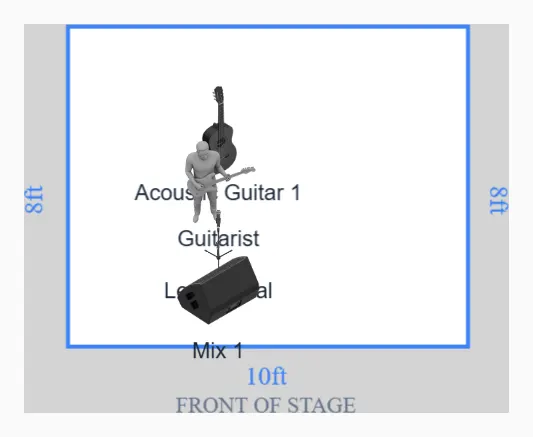
A two channel plot still needs to be a plot
A solo acoustic gig is the setup most likely to arrive with no paperwork at all, and it is also the setup most likely to get a bad line check. The engineer has no idea whether you are bringing a guitar with a pickup, a guitar with an internal mic, a preamp pedal, or nothing but a case and the hope that the venue owns a DI. This template fixes that with the least ink possible: a 10 by 8 foot footprint, one performer, and two channels that are named and placed.
The layout puts an acoustic guitar at centre with the player directly behind it, a vocal mic on a tripod boom stand about two feet downstage of that, and a single floor wedge at the front edge pointing back at the performer. The whole footprint fits the corner of a restaurant, the end of a patio, or a shallow riser at a cocktail hour.
Two channels, and both have a decision buried in them
Channel 1 is the guitar. Channel 2 is the vocal. That part is easy. What the engineer actually needs is how each one arrives at the stagebox.
For the guitar, say whether you are handing over a quarter inch jack that needs a box, or an XLR out of your own preamp pedal. If it is a jack, the venue supplies the box, and it is worth knowing what a DI actually does before you argue about tone with someone who has done this longer than you have. If it is a preamp with an XLR out, say whether it runs on a battery or needs the console to send phantom power down the line. A preamp that quietly dies mid set is almost always a battery nobody checked.
For the vocal, the default is a dynamic handheld on a boom. If you sing seated, put the seated height on the plot. A boom set for a standing singer is useless to you, and the fix costs 30 seconds at load in instead of two minutes during your first song.
One wedge, aimed properly
You get one monitor mix, so spend it well. The wedge sits centre front, angled up at your ears and deliberately off axis from the vocal capsule. That aim is the entire feedback story on a plot this small. A wedge pointed at the back of the mic gives you far more level before it rings than one parked square in front of it.
Ask for vocal first and guitar second. Most solo players over request guitar, lose pitch, then push the vocal until the wedge rings. In a small lively room, try asking for vocal only and letting the guitar reach you acoustically. It works more often than people expect and it buys real headroom. The reasoning behind that request order is in the monitor mix guide.
What to tell the front of house engineer
Two channels, no backline, one wedge, one power drop within reach of your pedal. That is the whole advance. Send it as a single line of email with the plot attached and you will be the easiest act on the sheet that night.
Two things worth flagging that a picture cannot show: whether you use a looper, because a looper changes what a muted channel does to your set, and whether you introduce songs on the same mic you sing on.
Variations that cover most rooms
- Pickup and internal mic together. That is two guitar channels, not one. Say so, or the blend gets made at your feet where the engineer cannot reach it.
- Wide stage. On an 8 foot riser, ask for a second wedge rather than a louder single one. Two quiet wedges beat one loud one every time.
- House PA with nobody running it. Standard on patios and in restaurants. Set gain conservatively and expect the room to get louder as it fills.
- Backing tracks from a phone or laptop. That is a stereo pair on top of your two channels, and it belongs on the plot before you arrive, not in a conversation at 7pm.
Open the template, rename the two channels to match your rig, and export the PDF. A one page plot for a two channel act reads in about four seconds, which is roughly how long an engineer has for it during a busy load in. Before you send it, run the stage plot checklist.