DJ
DJ Setup Stage Plot Template for Clubs and Party Events
A DJ setup stage plot template with a booth, a stereo main feed to front of house, a mic for the MC and two booth monitors, ready to send to any venue.
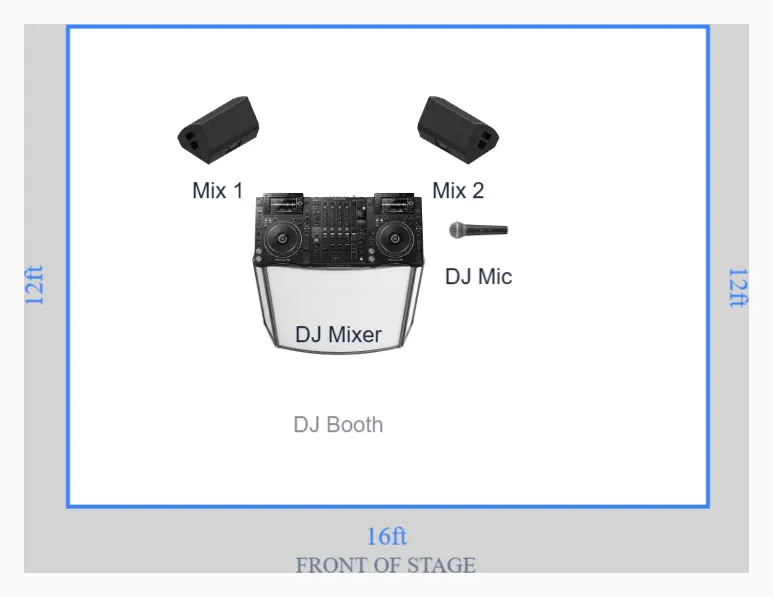
The whole document is really a booth spec
Nobody books a DJ and then wonders where the drum riser goes. What the venue actually needs to know is where the booth lands, how tall it is, how deep the table is, and what comes out of the back of it. That is the entire job of this plot, and at 16 by 12 feet it is the smallest footprint in the library.
The layout puts the DJ booth centre at 8 feet across and 7 feet back from the upstage edge, which leaves 5 feet of clear floor between the front of the booth and the downstage edge. That gap is not decoration. It is where a photographer kneels, where the promoter walks a guest through, and where a cable run has to survive four hours of foot traffic. The CDJ rig sits on the table at 8 by 5.5, a wireless handheld parks at 11.5 by 5.5 within reach of the right hand, and two booth wedges sit 4 feet upstage at 5 and 11 feet across.
Table height and depth decide whether the night works
Put two numbers on this plot before you send it: booth height and table depth.
A CDJ rig wants a playing surface at roughly 38 to 40 inches. Standard folding banquet tables land at 29 or 30 inches, which is a sore back by the third hour and puts your hands below the crowd's sight line. If the venue supplies the table, ask for a bar height table or a purpose built booth, and say the number rather than the word high.
Depth matters just as much. Two players, a mixer and a laptop stand need about 30 inches front to back. A 24 inch table means the laptop overhangs the back edge and the power brick dangles off it, which is how a set stops. The stage dimensions guide covers how to ask a venue these questions before load in rather than during it.
Two channels out, and the stereo decision inside them
The output of this entire rig is a stereo pair. Two channels at front of house, left and right, and that is most of your input list.
Say how they arrive. A balanced XLR pair from the mixer master is the clean answer and what most club mixers offer. Unbalanced RCA or a 3.5mm output is the answer that needs two DI boxes, and the venue needs to know that in advance, because two spare boxes is not a given on a busy night. Ask for the master out rather than the booth out, and label the pair at the stagebox. Folding this rig to mono is a real loss: modern dance production carries meaningful width, and a mono sum can partially cancel elements that were panned hard. The reasoning is in the guide to stereo sources at front of house.
The mic is channel 3. One wireless handheld for shout outs, birthdays and last call, and it wants a mute the DJ can reach without leaving the platters.
Hum is a ground loop until proven otherwise
A laptop on a charger plugged into a different circuit than the mixer is the most common source of buzz in a booth. The fix order takes 90 seconds and works most of the time.
- Run the laptop on battery for one song. If the hum vanishes, it is the power supply, and the answer is a ground lift or a different outlet.
- Put the laptop and the mixer on the same drop. Two circuits means two ground references and a loop between them.
- Use transformer isolated boxes on unbalanced outputs, not a cheap adapter cable. That is the whole reason DI boxes exist.
- Never lift the safety ground on a power cable. Lift the audio ground on the DI instead. One is a nuisance, the other is a hospital visit.
Booth level is a separate argument from PA level
The two wedges upstage of the booth are the DJ's own mix and they belong on their own send, not a copy of the mains. A DJ mixes to what they hear at the booth, so if the booth is 6 dB hotter than it should be, the whole set drifts quieter without anyone deciding to do that. Ask for booth level to be set in the first track and then left alone, and ask the engineer to say so if they change it.
One practical note. The wireless mic at 11.5 across sits within a few inches of the right hand wedge axis. Cup that capsule and it will ring. Angle that box slightly outward and keep the mic on the opposite side of the table whenever it is live.
The advance in four lines
Two channels of stereo program, one wireless mic, one booth mix, one 15 amp drop within 6 feet of the booth. Send that with the PDF attached and you are done. Add booth height and table depth as a production note, because those two numbers are the ones that actually go wrong.