Gear
DI Boxes Explained: What They Do and When You Need One
What a DI box actually does, when your instrument needs one, active versus passive, and why adding a DI to your stage plot does not add an input channel.
By Stageplot Pro Editorial Team Updated
What a DI box actually does
A direct injection box, or DI, takes a high impedance, unbalanced signal (the kind coming out of a keyboard's line output, a bass guitar, or an acoustic-electric's built in pickup) and converts it to a low impedance, balanced signal on an XLR connector. That conversion matters because unbalanced 1/4 inch cable starts losing high frequency detail and picking up noise past roughly 15 to 20 feet, while a balanced XLR run can go over 100 feet with no meaningful signal loss. A DI is what lets you run a bass or a keyboard 60 feet across a stage and into a snake without the tone falling apart or a hum showing up in the PA.
Active versus passive
A passive DI, like a Radial JDI, uses a transformer to do the conversion and needs no power at all. It handles hot signals well (a keyboard's line output, an acoustic-electric with an onboard preamp) and it is close to indestructible, which is why you see them on stages that get abused night after night. An active DI, like a Radial J48, uses an internal circuit instead of a transformer and needs 48 volts of phantom power from the console to run. Active DIs handle weaker or higher impedance signals better, like a passive bass pickup with no onboard preamp, or an acoustic guitar with a piezo pickup and no built in buffer. If you are not sure which type your instrument needs, a passive DI is the safer default for anything with its own onboard preamp, and an active DI is the better call for a passive pickup with no preamp of its own. The phantom power guide covers exactly which DIs need 48 volts and how to switch it on without a pop.
What actually needs a DI
Keyboards and synths almost always need one, since their line level outputs are unbalanced and often run a long distance to the snake. Bass guitars are commonly DI'd in addition to (or instead of) a mic'd cab, giving the engineer a clean, consistent low end signal that does not shift if the performer moves relative to the mic. Acoustic-electric guitars with a pickup, and any electronic instrument like a drum machine, sampler, or laptop output, also need one. Electric guitars run through a mic'd amp generally do not need a separate DI, since the cab and mic combination is already the signal path.
Why a DI does not add a channel
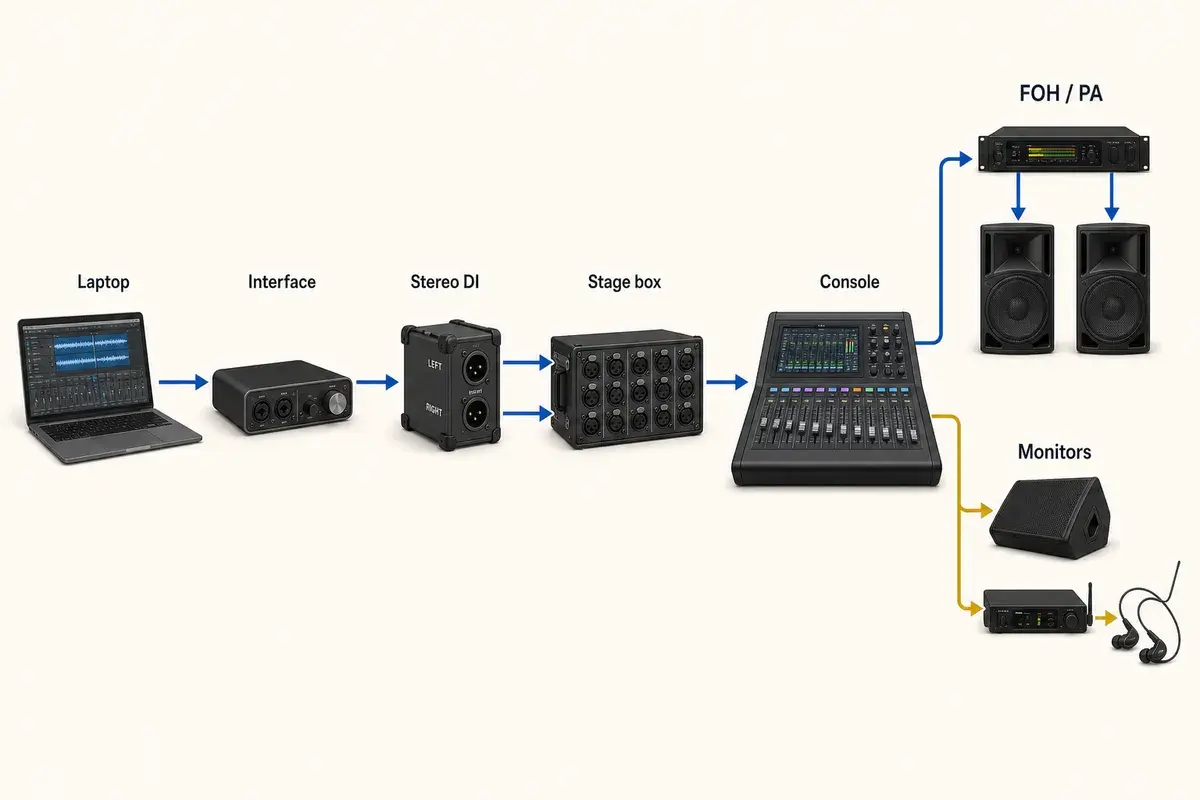
This is the single most common confusion when building an input list: a DI box is a converter, not a source. It does not generate a new signal, it reshapes the one signal already coming from the instrument. In the editor, placing a DI'd keyboard on your stage plot creates one channel for that keyboard, the same as if it were mic'd or run direct into a snake without a DI. Placing a separate DI icon next to an instrument that already has its own channel does not add a second channel, because the app derives your input list from the instrument itself, not from the boxes between the instrument and the stage box. This mirrors how a real console patch works: the engineer counts inputs, not gear.
Stereo sources need two DIs
A stereo keyboard, a stereo synth, or a laptop output with separate left and right lines needs a DI for each side, which is two channels, not one. It is easy to under-count this on a first pass at a plot, especially for a keyboard player running a wide stereo patch through two outputs. If you genuinely do not need the stereo image live, running a Y cable to sum to mono before a single DI is a legitimate option and saves a channel, but that is a decision to make deliberately, not by accident when you forget the second output exists.
Common DI models you will run into
A Radial ProDI or JDI covers most passive needs reliably and shows up on backlines everywhere. A Radial J48 or a Countryman Type 85 covers active needs where a passive box would leave a weak signal too quiet to work with. For acoustic guitars specifically, an LR Baggs Venue DI combines a DI with onboard EQ and a tuner, which is popular with solo and duo acoustic acts who want tone shaping without carrying a separate pedal. None of these choices change how the instrument shows up on your input list, a DI'd instrument is one channel regardless of which box handles the conversion, but knowing the common models helps you speak the same language as a house engineer when you are asking what is available on site.
Ground lift and hum
Every DI has a ground lift switch, and it exists for one reason: to break a ground loop between the DI and the amp or instrument it is connected to, which is the most common cause of a low hum in the PA. If you hear hum after patching a DI'd bass or keyboard, flip the ground lift before doing anything else. It resolves the issue instantly in most cases, and it is a much faster fix than chasing cable or power problems that are not actually the source.
Where you will see one on a stage plot
A solo acoustic performer running an acoustic-electric into a DI is one of the simplest and most common DI use cases you will build. An electronic duo setup running synths, drum machines, and a laptop out to the PA is almost entirely DI'd channels with no mics at all. In both cases, the DI icon on your plot represents where the conversion happens physically on stage, while the channel count on your input list still tracks back to the instrument.
The bottom line
Reach for a DI whenever an instrument's output is unbalanced, line level, or running any real distance to the snake. Choose passive for hot, buffered signals and active for weaker, unbuffered ones. And when you are building your stage plot, remember the DI is there to protect signal quality over distance, not to create an extra channel on your list.