Stageplot Pro Team /
Duo Stage Plot With Backing Tracks: Keep Playback Stereo
Plan a duo stage plot with backing tracks: show playback as a labeled stereo pair, choose DIs, route click to in-ears, and keep FOH from summing it to mono.

A duo with backing tracks looks simple on paper: two people, a couple of microphones, and a laptop. That simplicity is exactly what gets the playback rig misread. A house engineer who sees one laptop icon and the word "tracks" will often give it a single channel, plug in whichever cable reaches first, and move on. The result is a show where the stereo pads collapse, a hard panned guitar part vanishes, or the click leaks into the room. A good stage plot prevents all of that before load in, as long as it treats playback as a real source with two outputs.
What should a duo stage plot with backing tracks show?
It should show where both performers stand, every microphone and DI, the exact position of the playback rig, and the tracks drawn as two labeled inputs, left and right. Add monitor needs and power drops so the crew can set the stage without guessing.
For most duos, that means a short and very readable plot. Two vocal positions near the downstage edge, an acoustic guitar or keyboard at one of them, and a small table or stand for the laptop and interface. Mark stage left and stage right from the performer's point of view, facing the audience, and say so on the plot, since a venue tech reading it from the house side will otherwise flip everything. If one of you triggers the tracks, put the playback table within arm's reach of that person rather than tucked behind an amp.
If you would rather start from a working layout than a blank canvas, the acoustic duo stage plot template already places two performers, their mics and a DI position, and you can add the playback block on top of it.
Why does the playback source need to be a stereo pair?
Because your tracks were almost certainly mixed in stereo. If the engineer patches only one side, anything panned to the other side disappears. If they sum both sides into a single mono channel, wide or phase-shifted elements can thin out or partly cancel.
Think about what lives in a typical backing track: a synth pad widened with chorus, a doubled guitar split hard left and right, a shaker panned off to one side, stereo reverb returns. A left-only patch might drop the right-hand guitar entirely. A mono fold-down keeps both sides but can hollow out anything that relies on differences between the channels. Neither failure is obvious during a rushed line check, because the track still plays and still sounds loud. It just stops sounding like the record.
There is a fair case for mono in some rooms. A bar running one powered speaker, or a long narrow venue where half the crowd only hears one side of the PA, may be better served by a mono feed. The point is that the decision should be yours, made in advance with a mono-compatible bounce, not a guess made by someone patching your laptop in the dark. Write the request on the plot either way: "Tracks: stereo pair, please link" or "Tracks: mono bounce supplied, one channel."
How do you draw the playback rig on the plot?
Draw it as its own block with a clear label, a physical location, and two outputs heading to the stage box. Name the outputs "Tracks L" and "Tracks R" so the plot, the input list and the console scribble strips all use identical words.
A useful playback block answers the questions a stagehand will have when they walk up to it:
- What sits there: laptop, audio interface, and the stereo DI or line outputs.
- How it connects: two XLR lines from the DI to the stage box, or two balanced line outputs if the venue prefers that.
- What it needs: a power drop at the table, plus a stand or flat surface at a usable height.
- What it does not send: a short note that the click and count-ins stay off the front of house feed.
Keep the block in the same spot every night if you can. Engineers who work with you more than once start to remember where the laptop lives, and the patch goes faster when nothing moves.
Which DI should carry the tracks to the stage box?
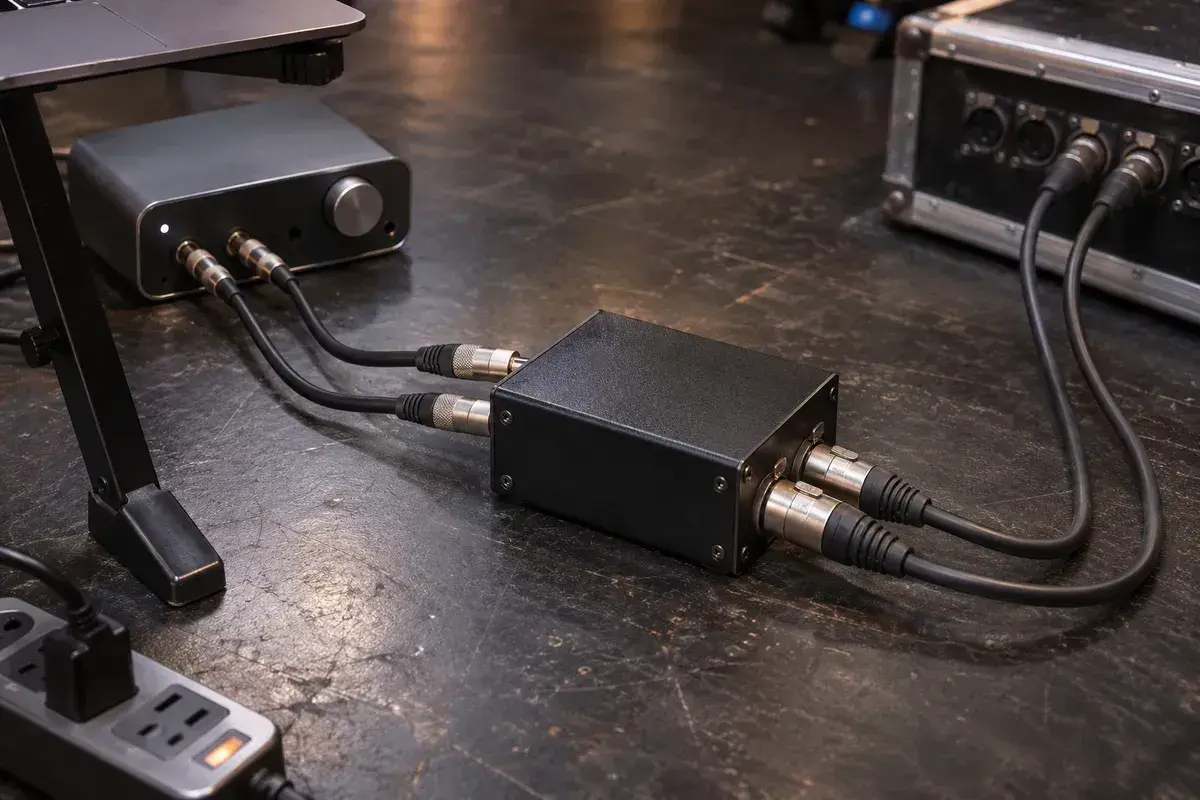
A two-channel DI is the cleanest choice, because it turns your interface's left and right outputs into two balanced mic-level lines in one box. It also gives the pair a single obvious home on the stage floor, which keeps the two cables together.
Most stage boxes expect mic-level XLR inputs, and most interfaces send line-level signals on quarter-inch jacks, so a DI sits naturally between them. A transformer-isolated DI has another practical benefit for laptop rigs: a laptop on its charger, connected to an interface and then to a PA, is a classic recipe for ground loop hum. Radial describes its ProD2 stereo passive direct box as a two-channel unit built for stereo sources such as keyboards and samplers, and notes that its transformers are particularly good at removing hum and buzz from ground loops. For rigs fed from consumer jacks, Radial's ProAV2 stereo multimedia direct box is a two-channel passive DI with several input connector types aimed at mixed audio sources.
Try to avoid running tracks from the laptop headphone jack. It is unbalanced, it shares its volume with system sounds, and a cheap breakout cable is easy to knock loose. If it is genuinely your only output, use a solid 3.5 mm to dual quarter-inch cable into a stereo DI and turn off system alerts before you play. For a deeper look at pairing, gain matching and linking, read the guide to stereo inputs for keyboards and playback.
How should the input list number the track channels?
Give the tracks two adjacent channels, left on the lower number and right on the next. On many digital consoles, adjacent odd and even channels are the easiest to link as a stereo pair, so placing Tracks L on an odd channel saves the engineer a re-patch.
A typical duo input list might read like this:
- 1: Vocal 1, lead
- 2: Vocal 2, harmony
- 3: Acoustic guitar, DI
- 4: Keys L
- 5: Keys R
- 6: Tracks L
- 7: Tracks R
- 8: Spare vocal or guest input
If your keyboard is mono, drop channel 5 and slide the tracks up so the pair still starts on an odd number. Use the same names on the plot and the list. "Tracks L" on one document and "Laptop 1" on the other forces the engineer to stop and work out whether they are the same thing.
Remember that the input list and the stage plot are different documents doing different jobs. The plot shows where the laptop table stands and which way the cables run. The list tells the engineer which console channel each signal lands on. A duo needs both, even with fewer than ten inputs.
Where does the click go if the audience must not hear it?
Keep the click on its own pair of interface outputs that feed only your in-ear monitors. Send the music on outputs 1 and 2 to the stage box, and the click and spoken cues on separate outputs to your monitor system, never to front of house.
Playback software and multi-output interfaces generally let you assign the click and cue tracks to different outputs from the music. Once they are separated, nothing about the front of house patch can accidentally expose them. If your rig can only produce one stereo output, some players put the click on one side and a mono music bounce on the other, but that approach removes your stereo image and is easy to patch wrongly, so treat it as a fallback.
Whatever you choose, write it on the plot in plain words: "Click and cues: IEM only, not patched to FOH." If either of you uses wedges instead of in-ears, decide whether you need the click at all, since a wedge playing a click near a vocal mic will put it into the room.
What monitor requests make sense for a duo running tracks?
Ask for two separate mixes, one per performer, and state how each of you listens. If you are on stereo in-ears, ask for the tracks as a linked pair in your mix so the image matches what the audience hears.
A duo usually needs less from monitors than a band does, but the requests are more specific. The person triggering playback often wants the click loudest, then their own voice, then a moderate amount of the tracks. The other performer may want more track and harmony vocal and no click at all. Write each mix as a short line under the performer's position, such as "Mix 1, IEM stereo: click, own vocal, tracks, a little guitar." If one of you is on a wedge, note its position and which way it should point.
How do you handle power and failure at the playback position?
Request a dedicated power drop at the playback table on the plot, and plan what happens if the laptop stops. A laptop running on a battery that dies mid-set, or a power strip shared with a fog machine, is a problem you can design out ahead of time.
Practical steps include:
- Mark the power drop exactly where the laptop sits, not at the side of the stage.
- Disable sleep, automatic updates and notifications before the show.
- Keep the interface firmly attached with a secured cable, so an elbow cannot pull it.
- Decide in advance which songs you can play without tracks if playback fails.
A quick note on the plot such as "If tracks fail, we continue acoustic" also tells the engineer not to panic and start unplugging cables while you recover.
What should you send the engineer before the show?
Send the stage plot and input list together in one advance message, with the stereo playback request written on both. Include a short line about click routing and the power drop so nothing depends on a conversation at load in.
The engineer should be able to read your advance once and know three things: the tracks arrive as a stereo pair on two named channels, the click never reaches the audience, and the playback table needs power in a specific spot. Get those three right and a duo with a laptop becomes one of the easiest acts of the night to set up.
Frequently asked questions
- Can a duo run backing tracks from a phone instead of a laptop?
- Yes, many duos do. Treat the phone exactly like a laptop on the stage plot: draw it as a playback block, show two outputs labeled Tracks L and Tracks R, and run it through a stereo DI. Use airplane mode, disable notifications, and keep it on a stand or mount rather than on the floor, since a call or alert sound through the PA is hard to recover from.
- What if the venue only has a mono PA system?
- Then a mono feed is reasonable, but you should provide it on purpose. Prepare a mono bounce of your tracks that you have checked for missing or thin parts, and write "Tracks: mono bounce, one channel" on the plot. That way the engineer is not forced to pick one side of a stereo file or sum it blindly.
- Do backing tracks count as one input or two on the input list?
- Stereo tracks count as two inputs, one for the left channel and one for the right. List them on adjacent channels with matching names, such as Tracks L and Tracks R, and add a note asking the engineer to link them as a stereo pair. A click sent only to in-ear monitors does not need a front of house channel at all.
- Should the engineer or the duo control the track volume?
- Set a consistent output level from your laptop and leave it alone, then let the engineer balance the tracks against the live vocals and instruments at the console. If you change levels inside your playback session between songs, tell the engineer during soundcheck so they are not chasing sudden jumps during the set.