Monitor Mixes
How to Build a Monitor Mix Your Band Will Actually Like
How to build a monitor mix your band can actually perform to, covering wedge placement, aux sends, feedback control, and what to ask for at soundcheck.
By Stageplot Pro Editorial Team Updated
A monitor mix is not the house mix
The house mix is built for the audience. A monitor mix is built for one performer to be able to play in time and in tune, and every performer on stage needs a different one. The drummer usually wants click, bass, and just enough of their own kit to sit in the pocket. The lead vocalist usually wants their own voice loud and everything else quieter than the house mix would suggest, because pitch is hard to hold when you cannot hear yourself clearly. Building one mix and sending it to every wedge on stage is the single most common reason bands complain about monitors, and it is entirely avoidable.
Wedges versus in ears
Wedge monitors are floor speakers angled up at a performer, driven by an aux send from the console. They are simple, they need no extra hardware per performer, and they leak into every microphone on stage, which limits how loud you can push them before feedback becomes a problem. In ear monitors (IEMs) isolate each performer in a sealed mix with no stage bleed, which means a much cleaner front of house mix and no feedback risk from the monitor side, at the cost of a beltpack and IEMs per performer and a personal mixing system like an Aviom A-16II or a Behringer P16 if you want each player controlling their own blend.
Most working bands run a hybrid: IEMs for the drummer and anyone on a click or backing tracks, wedges for everyone else. That is a reasonable default if your budget does not stretch to a full IEM rig for the whole band.
How aux sends work
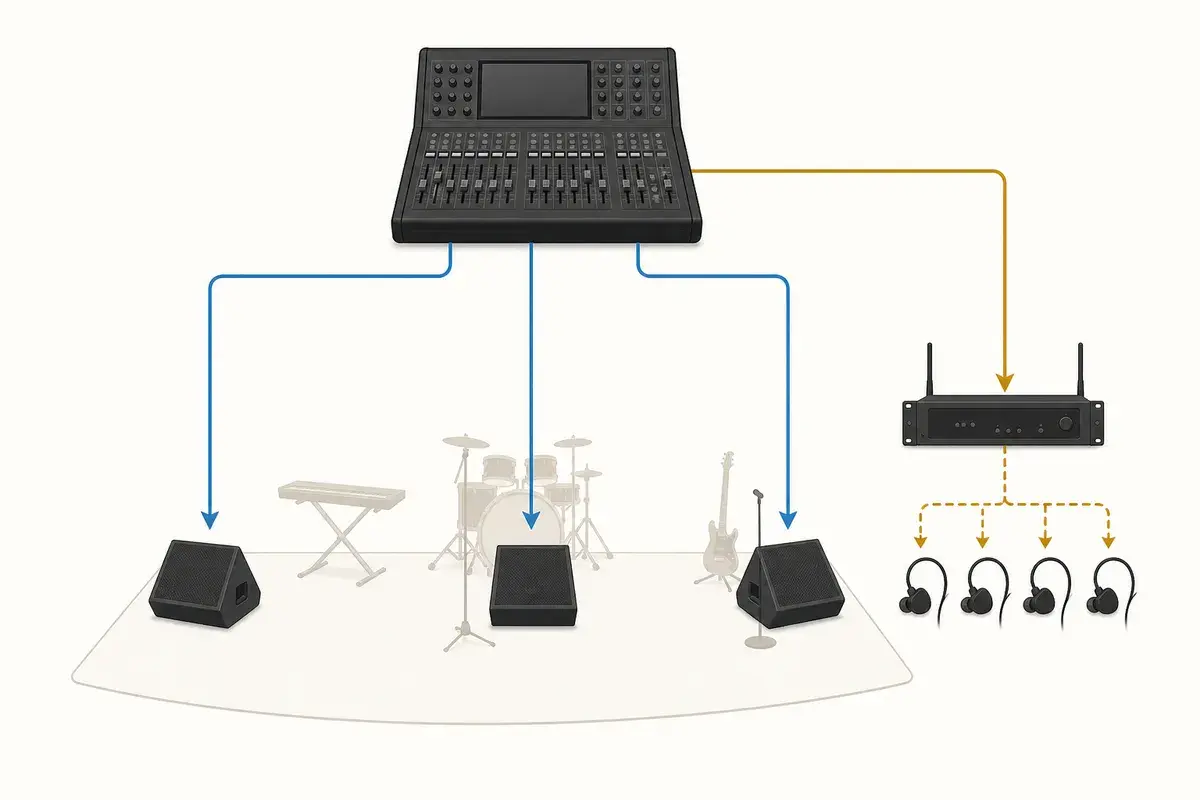
Each monitor mix pulls from an aux send on the console, and each send is its own independent blend of the same input channels feeding the house mix. A four piece band with four separate wedge mixes needs four aux sends, one per performer, each dialed to what that specific player needs to hear. On a digital console like an X32 or an SQ, each send can also carry its own EQ and compression separate from the house channel, which is how an engineer tames a hot vocal in the monitor without touching what the audience hears.
If your band runs a fixed lineup and repeats the same rooms, ask the engineer to save your monitor scene so it recalls instead of getting rebuilt from scratch every show. Most digital desks support scene recall by name, and a saved starting point turns a 20 minute monitor build into a 5 minute check.
Building the mix from the performer's side
Start each monitor mix from what that performer needs to do their job, not from a even blend of everything. A guitarist who sings backing vocals needs enough of their own guitar to stay in time and enough of the lead vocal to know where they are in the song, but does not need a loud drum mix if they are not locking to the kit directly. The drummer is the opposite: click and bass first, everything else is secondary. Ask each player directly what they need more or less of rather than assuming, and expect the answer to change between the ballad and the closer.
Feedback control
Feedback happens when a monitor's output re-enters a live mic loud enough to ring. The fix starts with wedge placement and aim, not EQ: keep the wedge pointed at the performer's ears and away from the mic capsule, and keep gain before feedback in mind when setting levels, not just "as loud as requested." A quick ring-out before doors, sweeping a narrow parametric cut at the frequencies that ring first, buys headroom before a hot moment in the set pushes a wedge past the edge. If a specific mic on stage rings consistently, moving it a few inches or angling it away from the nearest wedge often solves what EQ alone cannot.
What to ask for at soundcheck
Be specific and be quick. "More of me" tells the engineer nothing useful. "More vocal, less guitar" gets fixed in seconds. If your band uses backing tracks or a click, confirm before the set that the click is only in the drummer's mix (and any other player who needs it) and not bleeding into wedges near the front of the stage where the audience could hear it. A clear input list that flags which channels are click or track sources helps the engineer route them correctly the first time, instead of during a rushed line check.
Scaling monitor mixes with band size
Monitor complexity grows fast with band size. A wedding band running eight pieces with horns, keys, and multiple vocalists often needs six or more independent mixes, which is exactly the point where a personal monitor mixing system earns its cost, since one engineer building six full custom mixes from a single console during a short changeover is a real bottleneck. A full worship band running a click, backing tracks, and several vocal mics runs into the same problem: more mixes than one person can realistically ride live, song to song, without giving performers some control over their own blend through a personal mixer.
Put it on the plot
Note wedge count and IEM needs directly on your stage plot so the engineer sees monitor requirements before load in, not as a surprise once the band is on stage. Pair it with a clear input list and you have given the engineer everything they need to build usable mixes before your first note, instead of guessing during a rushed line check. Build both in the editor so they stay in sync as your setup changes.