Input Lists
How to Build an Input List That Matches Your Stage Plot
A practical walkthrough for building an accurate input list from your stage plot, covering channel order, labeling, DI boxes, and how the app counts channels.
By Stageplot Pro Editorial Team Updated
What an input list actually does
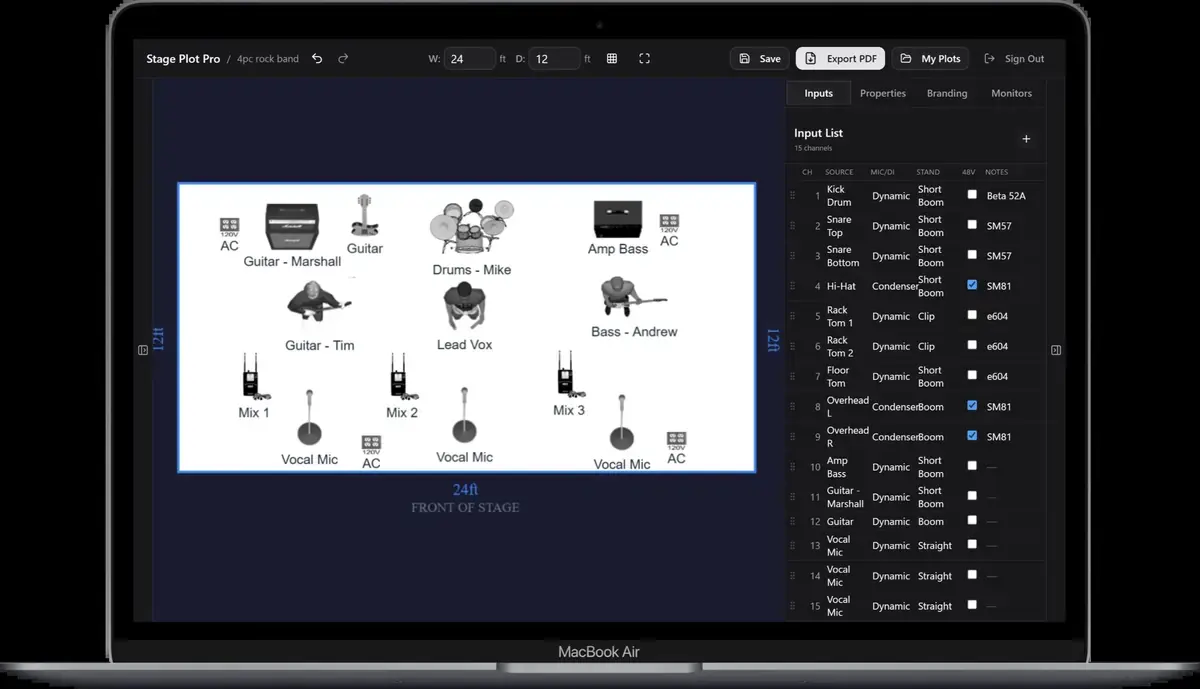
An input list is the channel by channel map the engineer patches from before you play a note. It pairs every microphone and DI with a channel number and a label, in the order they will hit the console. A stage plot shows where things sit. An input list shows what gets plugged into what. You need both, and they need to agree with each other, or the first ten minutes of your soundcheck get spent reconciling a diagram against a patch sheet instead of checking sound.
How the app builds it for you
In the editor, your input list generates automatically from the icons you place on the stage. Drop a mic'd kick drum on the canvas and it adds a channel. Drop a DI'd bass and it adds a channel. The list updates live as you build, so by the time your plot is done, your input list is done too, in the same pass instead of a second document you build separately and hope matches.
This matters because the most common input list error is a mismatch between what the plot shows and what the list says. A hand built spreadsheet next to a hand built diagram drifts the moment you swap an amp or add a mic, because nobody remembers to update both. Generating the list from the plot itself removes that failure mode entirely.
Channels come from instruments, not extra gear
One rule trips up almost every band building their first list: a DI box does not create a channel, the instrument plugged into it does. If you place a keyboard with a DI, that is one channel, not two. A pedalboard or FX unit in front of an amp does not add a channel either, the mic'd or DI'd amp still outputs one signal. This matches how a real stage works. The console does not care how many boxes your signal passed through on the way to the stage box, it cares how many discrete outputs are leaving the stage. If you are unclear on when a DI belongs in your setup at all, read the DI boxes explained guide before you finalize your list.
Order your channels the way an engineer expects
There is a loose industry convention for channel order, and following it saves the engineer real time: drums first (kick in, kick out if used, snare top, snare bottom if used, hi hat, toms low to high, overheads left and right), then bass, then guitars, then keys, then vocals from lead to backing. This is not a rigid rule, but it is the order most engineers scan for first, and a list that follows it reads faster than one in whatever order you happened to place icons on the canvas.
Number your channels starting at 1 and leave the numbering contiguous. Do not leave gaps "in case," and do not renumber mid-list if you add something late, just append it at the end in its logical section.
Label clearly, every time
Use labels a stranger could patch from cold: "Kick In," "Snare Top," "Guitar 1 Amp," "Bass DI," "Keys L," "Keys R," "Lead Vox," "BGV 1." Skip abbreviations that only make sense to your band, and skip performer names, since the engineer needs to know what the signal is, not who is playing it. If two inputs are functionally identical, like two backing vocal mics, number them rather than leaving them both labeled the same way.
Account for phantom power needs
Any condenser mic or active DI on your list needs 48 volts from the console or stage box. Most digital consoles switch phantom power per channel, so it costs you nothing to flag it, but an engineer who does not know a channel needs phantom power will patch it, hear nothing, and burn a few minutes tracing a problem that a one line note would have prevented. If you are not sure which of your mics and DIs need it, the phantom power guide breaks down exactly which gear requires 48 volts and which gear it can damage.
Matching channel count to your lineup
Channel counts vary a lot by lineup, and knowing what is typical for a similar setup helps you sanity check your own list before you send it. A jazz quartet running upright bass, piano, drums, and a horn or vocal typically lands around 10 to 12 channels once overheads and DIs are counted. A five piece rock band with a full mic'd kit, two guitar cabs, a bass DI, and three vocal mics usually runs 16 to 18 channels. If your list is well outside what a comparable lineup would need, either you are over-micing something that does not need it, or you have missed an input somewhere, and either way it is worth a second pass before you send it out as part of your advance.
Leave room for the unexpected
If your channel budget allows it, note one or two spare inputs on your list, especially if you are opening for another act or sharing a stage with a house band. A spare channel that is pre-patched saves five minutes when someone needs to plug in a last minute acoustic guitar or a guest vocalist. It costs you nothing to list it and saves real time on a tight changeover.
Keep it attached to your plot
Export your input list alongside your stage plot as part of your advance, and send both together, not as separate emails days apart. A tech rider that includes a current input list and a current stage plot is the single most useful document you can put in front of a house engineer before a show, and it is the difference between a fifteen minute line check and a slow, guesswork soundcheck that eats into your set time.
| Column | Example |
|---|---|
| Channel | 01 |
| Source | Kick |
| Mic or connection | Beta 52 / venue equivalent |
| Stand or DI | Short boom |
| 48 V | No |
| Notes | Inside port; drummer upstage centre |