Input Lists
Playback Rig Input List: Tracks, Click, and Timecode
Build a playback rig input list that separates tracks, click, guide, timecode, redundant outputs, DI channels, monitor routing, and front-of-house notes.
By Stageplot Pro Editorial Team Updated
Playback is a routing plan, not one “laptop channel”
A playback rig can be as small as stereo tracks plus a drummer click, or it
can carry redundant computers, guide cues, SMPTE LTC, MIDI, and stems. The
input list must describe the physical outputs that arrive at production, not
the software tracks inside a session. A row called Laptop tells an engineer
nothing about channel count, DI needs, or what must stay out of front of house.
| Channel | Destination and note |
|---|---|
| 01 Tracks L | Front of house and designated monitor mixes; isolated line or DI channel. |
| 02 Tracks R | Front of house and designated monitor mixes; paired with channel 01. |
| 03 Click | Monitor mixes only. Never route to front of house. |
| 04 Guide | Selected IEM packs only; spoken cues, not audience program. |
| 05 LTC timecode | Lighting, video, or show-control destination only when production confirms compatibility. |
| 06 Backup tracks mono | Tested emergency program source; specify how the handoff occurs. |
Label outputs by what they do
Use Tracks L, Tracks R, Click, Guide, and LTC, not Output 1 through
Output 5. The names should match the audio-interface labels, the cable loom,
the input list, and the console patch. When a cable fails during a changeover,
matching labels make a short problem solvable without reopening a laptop
session.
If your stereo program contains all musical backing tracks, label the pair as such. If the right side contains click, it is not stereo tracks: it is a mono program plus click arrangement. Naming it accurately prevents an engineer from linking the two channels and sending click to the audience.
Keep performer cues separate from the audience mix
Click and guide are working tools, not musical program. Mark the exact monitor mixes that receive them. Most bands route click only to the drummer and any player responsible for cueing the arrangement. Guide may go to a musical director or selected IEM packs. Both need explicit monitor-only notes in the monitor request as well as the input list.
LTC timecode also needs a named destination and a production conversation. It is not automatically useful to every venue, and it should not be patched into a general audio input simply because it is available from the interface.
DI, isolation, and stage placement
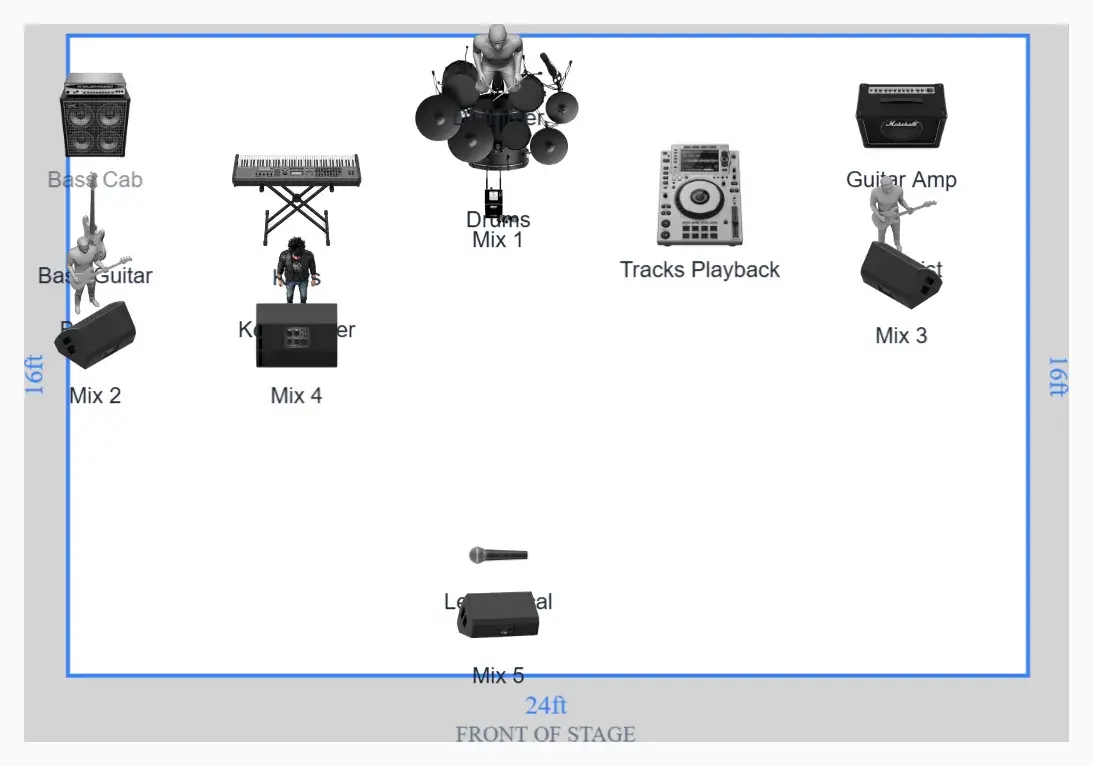
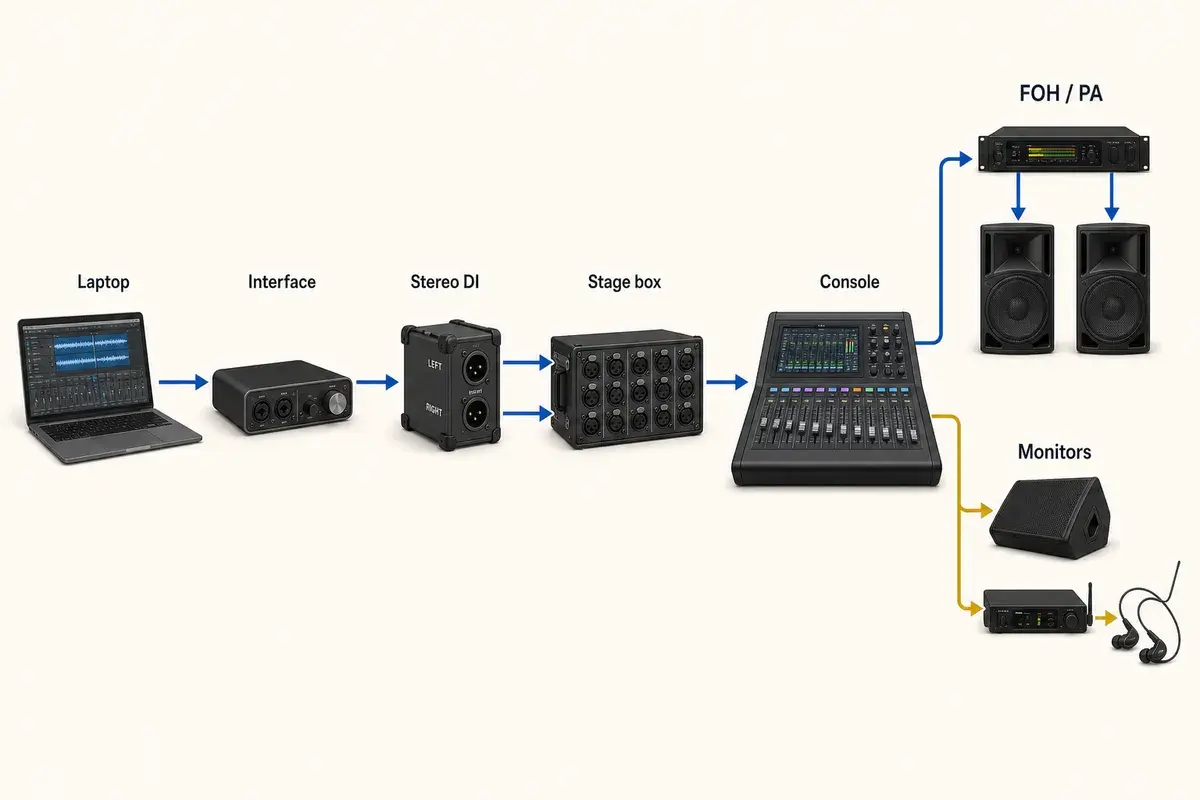
Most computer interfaces produce balanced line-level outputs. A suitable isolation or DI solution protects against ground noise and makes the handoff to a stage box predictable, but the exact method depends on the interface, the cable run, and the production system. State what the artist provides and what must be supplied by the venue. Show the laptop, interface, DIs, and cable exit point on the stage plot so stage crew do not discover a playback station only after their multicore is in place.
Plan the failure path before the first show
Every playback act needs a rehearsed fallback. That might be a second computer through an automatic switcher, a spare interface, or a tested mono program source. The rider should name the failure method in one sentence; the detailed system diagram can travel separately when production needs it. Do not invent a backup plan at front of house after the primary system has failed.
For paired channels and deliberate mono fallbacks, see the stereo inputs, keyboards, and playback guide.
Frequently asked questions
Should click be on the input list?
Yes. It uses a physical input and needs a clear monitor-only routing note.
Can I put click on one side of a stereo file?
You can build a mono-program-plus-click configuration, but label it honestly. It is not a stereo track pair.
Do all venues need LTC timecode?
No. Use it only when the production has compatible lighting, video, or show-control workflow and confirms the handoff.
Field workflow: turn the advice into a usable advance
Playback is a system of outputs with different destinations. Stereo program belongs in the PA, click usually belongs only in selected monitor mixes, guide may serve a musical director, and LTC belongs at a compatible show-control destination. The input list must describe those physical handoffs rather than the software session inside the laptop.
Use this workflow
- List every interface output by content and connector.
- Separate audience program from click, guide, cue, and timecode.
- Document DI or isolation responsibility and stage-box landing point.
- Name the monitor mixes that receive private cues.
- Rehearse a mono and hardware-failure fallback.
Working example
A compact rig may send Tracks L/R on outputs 1–2, drummer click on 3, guide on 4, and LTC on 5. That is five physical paths. If the backup source is mono, label it as a separate tested fallback and describe how the technician switches to it; do not assume a venue will invent the changeover during a failure.
Engineer’s note
Balanced interface outputs may connect through line isolation, DI channels, or an agreed balanced input path depending on level, grounding, and cable distance. The artist should state what the rig provides and where the handoff occurs. The local engineer decides the suitable patch into the installed system.
Adapt it to the venue without losing the source of truth
Keep one master document for the traveling lineup, then make a deliberate venue or format revision when the stage, backline, channel capacity, monitor system, or performer count changes. Put the revision date in the file and on the page. If a venue proposes a substitution, record the accepted change in the advance thread instead of quietly turning it into a permanent requirement.
When resources are limited, reduce the plan in an agreed order. Protect the sources and outputs that carry timing, pitch, safety, and show control first; simplify preferences second. A tested mono playback feed, shared wedge plan, reduced drum-mic package, or alternate backline choice is useful only when the band has approved it before the changeover clock starts.
Run a two-minute production review
Read the finished package from the perspective of a technician meeting the act for the first time. Count the physical connections, identify the artist handoff points, trace private cues to their destinations, and separate facts from requests. Then compare the terminology across the plot, list, rider, cable labels, and email. A source with three different names becomes three separate troubleshooting questions.
After the show, capture only changes that will travel. Update the master for a new performer, instrument, output, monitor system, or permanent rig change. Leave one-night venue substitutions in the date notes. This keeps a useful local workaround from becoming inaccurate information on every future advance.
Final verification
- Program channels are paired correctly.
- Click cannot reach the main PA.
- Timecode has a confirmed destination.
- The fallback has been rehearsed.
Ask someone who did not build the document to review it for two minutes. If they cannot identify the performers, inputs, monitor plan, ownership, and unresolved questions without coaching, revise the labels before sending it. A fast independent read is the closest rehearsal for how production will use the material.