Input Lists
Band Input List Template for Live Sound and Venues
Copy a practical band input list format for channels, sources, microphones, DI boxes, phantom power, stands, monitor notes, and venue advance paperwork.
By Stageplot Pro Editorial Team Updated
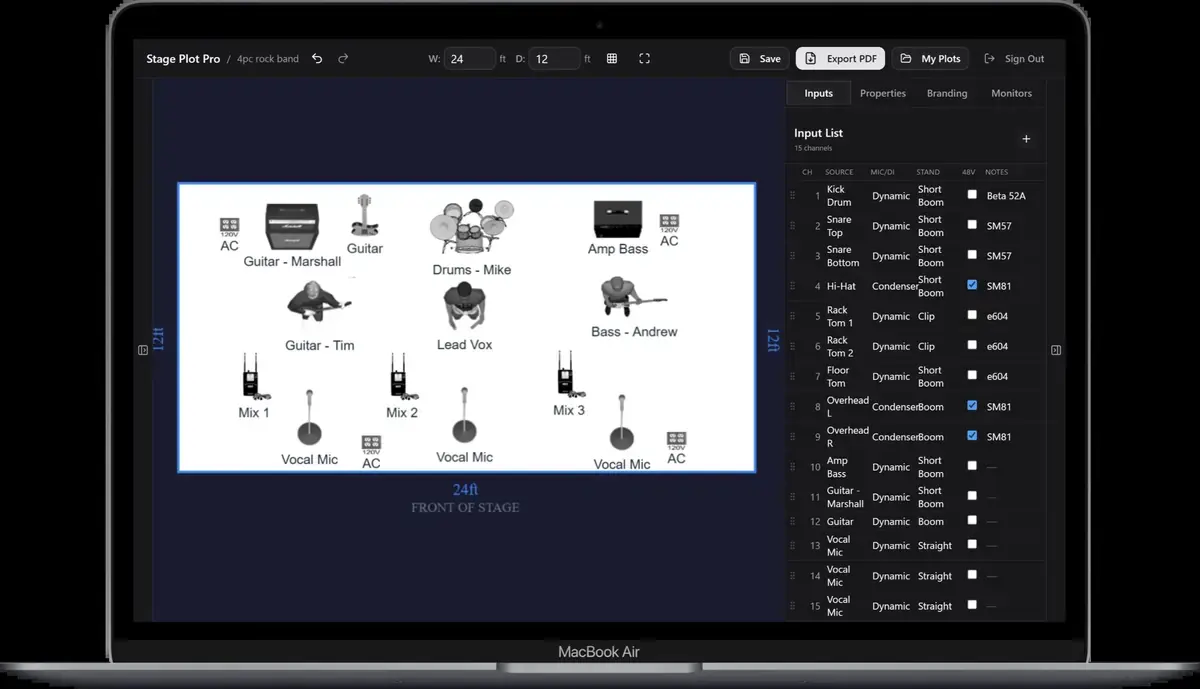
A practical input list format
An input list is most useful when a house engineer can scan it without learning your private shorthand. Use consistent columns, short source names, and one row for every physical input that reaches the console.
| Channel and source | Connection and notes |
|---|---|
| 01 Kick | Venue kick mic; short stand; no 48 V |
| 02 Snare top | Dynamic mic; short boom; no 48 V |
| 03 Rack tom | Clip-on dynamic; no 48 V |
| 04 Floor tom | Clip-on dynamic; no 48 V |
| 05 Overhead L | Condenser; tall boom; 48 V required |
| 06 Overhead R | Condenser; tall boom; 48 V required |
| 07 Bass DI | Active DI; pre-amp output; 48 V only if DI supports it |
| 08 Guitar | Dynamic mic on guitar cabinet; short boom |
| 09 Keys L | DI channel 1; paired with channel 10 |
| 10 Keys R | DI channel 2; paired with channel 9 |
| 11 Lead vocal | Preferred vocal mic or venue equivalent; tall boom |
| 12 Drum vocal | Dynamic vocal mic; tall boom |
The exact microphone model may be a preference rather than a requirement. If
the show works with an equivalent, write venue equivalent so the list does not
look like a hard rental specification. Put non-negotiable technical requirements
in the rider and explain why they are necessary.
Recommended columns
Channel
Use whole numbers in the order you expect the console to be patched. Do not restart numbering for each musician. If the venue repatches the order, the source labels should still make the list understandable.
Source
Name what the engineer is listening to: Kick, Bass DI, Tracks L, or Lead vocal. Avoid labels that make sense only inside the band. Performer names can
help, but pair them with the role: Maya - lead vocal.
Microphone or connection
State whether the source arrives by microphone, active DI, passive DI, line
isolator, USB interface, or another connection. A keyboard output labelled only
Keys does not tell the stage crew whether to prepare one DI, two DIs, or a
stereo line input.
Stand, clamp, or DI
Stand requirements affect stage preparation. A kick mic uses a short stand, an overhead uses a tall boom, and a seated horn player may need a boom that clears a music stand. List specialty clamps or artist-provided DIs where they matter.
Phantom power
Document which condenser microphones or active DIs require 48 V. The engineer still decides when to enable it after patching and muting the system. Never describe phantom power as something that should be switched on before cables are checked.
Notes
Use notes for details that change the patch: inside/outside kick position, pre/post amplifier DI, playback output assignment, guest mic, spare channel, or monitor-only signal. Keep performance requests and mix criticism out of the input sheet.
Keep the template tied to the stage plot
The list above is not a universal prescription. Your drum kit, stereo sources, vocals, playback, and guest inputs determine the final count. Build the visual layout first, derive the channels from the actual sources, and compare both documents before sending them.
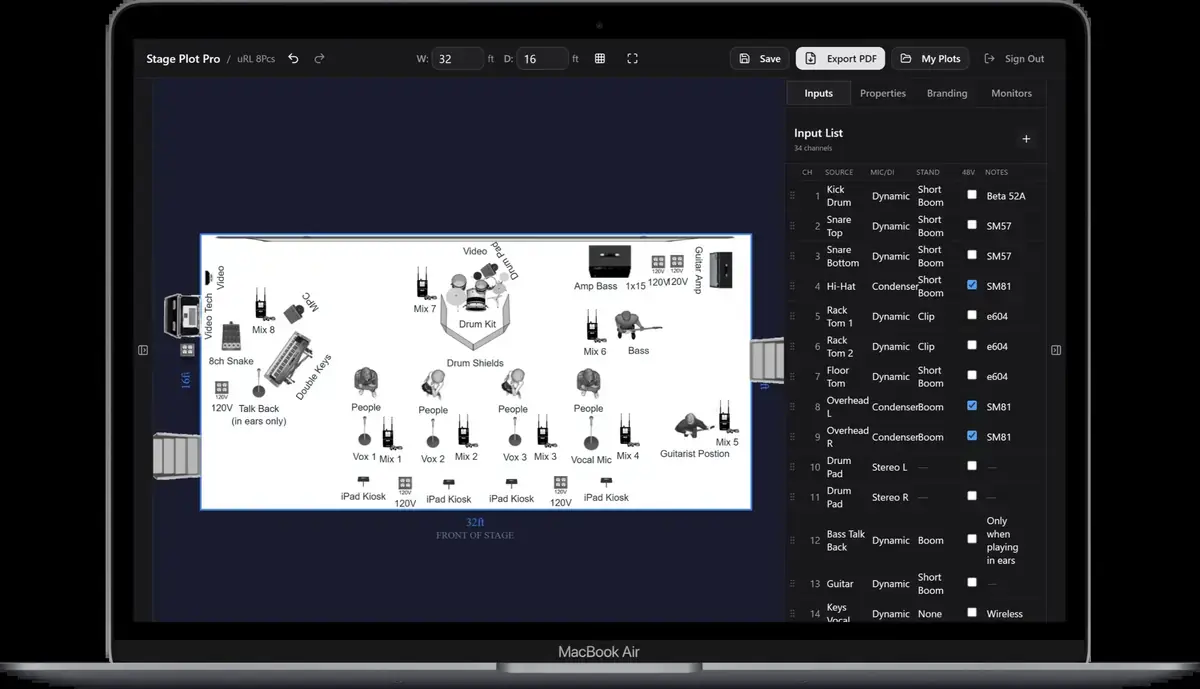
For a larger example, the eight-piece wedding-band template can include drums, bass, guitar, stereo keys, tracks, several horns, and multiple vocals. Its value is not the number of channels; it is the consistent relationship between the positions on stage and the rows on the list.
Frequently asked questions
Is an input list the same as a patch list?
They often refer to the same channel-by-channel document. A patch sheet may contain additional physical stage-box or console-socket assignments.
Should I list microphone models?
List a preferred model or useful type, and say when an equivalent is acceptable. Treat true requirements as rider items.
Can I send an Excel file instead of a PDF?
A spreadsheet is useful for editing, but send a stable PDF or shared view for the advance so rows and formatting do not change between systems.
Field workflow: turn the advice into a usable advance
A template becomes production-ready when each row represents one physical signal that will reach the console. Count stereo sources twice, include monitor-only click or guide channels, and keep related outputs adjacent. The list should remain understandable after the venue changes microphone models or reorders the console surface.
Use this workflow
- Inventory sources performer by performer.
- Split stereo, multi-mic, and playback systems into physical outputs.
- Name the source before adding microphone or DI preferences.
- Add stand, phantom-power, destination, and artist-supplied notes only where useful.
- Compare the final row count with the plot and cable loom.
Working example
A keyboard station with stereo keys, stereo tracks, click, and one vocal is six channels, not three devices. A useful list shows Keys L, Keys R, Tracks L, Tracks R, Click, and Vocal. Click is marked monitor-only; the stereo pairs remain adjacent; DI responsibility is stated once without turning the notes column into a paragraph.
Engineer’s note
Do not list a DI box, stage box, stand, cable, or monitor as an extra audio channel unless it produces a separate signal. Conversely, do not hide two outputs behind a row labelled stereo. The channel count must follow the copper or digital paths that actually enter the system.
Adapt it to the venue without losing the source of truth
Keep one master document for the traveling lineup, then make a deliberate venue or format revision when the stage, backline, channel capacity, monitor system, or performer count changes. Put the revision date in the file and on the page. If a venue proposes a substitution, record the accepted change in the advance thread instead of quietly turning it into a permanent requirement.
When resources are limited, reduce the plan in an agreed order. Protect the sources and outputs that carry timing, pitch, safety, and show control first; simplify preferences second. A tested mono playback feed, shared wedge plan, reduced drum-mic package, or alternate backline choice is useful only when the band has approved it before the changeover clock starts.
Run a two-minute production review
Read the finished package from the perspective of a technician meeting the act for the first time. Count the physical connections, identify the artist handoff points, trace private cues to their destinations, and separate facts from requests. Then compare the terminology across the plot, list, rider, cable labels, and email. A source with three different names becomes three separate troubleshooting questions.
After the show, capture only changes that will travel. Update the master for a new performer, instrument, output, monitor system, or permanent rig change. Leave one-night venue substitutions in the date notes. This keeps a useful local workaround from becoming inaccurate information on every future advance.
Final verification
- Every row has one source name.
- Stereo pairs use two rows.
- Monitor-only channels name destinations.
- The total matches the real rig.
Ask someone who did not build the document to review it for two minutes. If they cannot identify the performers, inputs, monitor plan, ownership, and unresolved questions without coaching, revise the labels before sending it. A fast independent read is the closest rehearsal for how production will use the material.